
Choosing a password manager is often treated as a simple comparison of features, pricing, or brand popularity. In reality, this approach misses the most important point: there is no single “best” password manager for every business. What matters is whether a solution aligns with your company’s structure, risk exposure, and day-to-day operations. Small and medium-sized businesses in particular do not need more complexity—they need clarity, reliability, and security that actually works in practice. The decision is therefore not about picking the most advanced tool, but about selecting the one that fits your level of responsibility, technical capacity, and security expectations.
“The average employee manages over 80 work-related passwords. Without a system, most of them will take shortcuts that put your business at risk.”
Why choosing the right password manager is critical
Most security incidents do not start with sophisticated attacks or highly advanced hackers. They begin with simple, avoidable weaknesses inside the company – weaknesses that are often overlooked because they seem trivial in everyday operations.
In practice, the most common causes include reused passwords across multiple systems, insecure sharing of credentials within teams, and a lack of visibility over who has access to which accounts. Over time, this creates a fragmented and uncontrolled environment where sensitive access points are no longer clearly managed.
For example, employees may reuse the same password for email, cloud services, and internal tools. Credentials are shared via email, chat, or even spreadsheets. Former employees or external partners may still have access to critical systems because no one has a clear overview of existing permissions. These are not theoretical risks—they are everyday realities in many small and medium-sized businesses.
This is exactly where a password manager becomes a central security component, not just a convenience tool. A properly implemented solution helps enforce strong, unique passwords, enables controlled and traceable sharing, and creates a structured overview of all credentials within the organization.
However, the key point is often underestimated: a password manager only delivers real security if it fits the organization. A tool that is too complex will not be used consistently. A solution that lacks necessary controls will not reduce risk effectively. Security, in this context, is not defined by features alone—but by adoption, usability, and alignment with real business processes.
Choosing the right password manager is therefore not a technical detail. It is a strategic decision that directly impacts how securely your company operates on a daily basis.
For example, employees may reuse the same password for email, cloud services, and internal tools. This significantly increases the risk of unauthorized access, especially if passwords are weak or predictable. Understanding how to create secure passwords that are extremely difficult to crack is therefore a fundamental part of any security strategy.
1. Keeper Security – The pragmatic business standard
Keeper has built its reputation on one thing above all: security depth. It is the only password manager on this list to be recognised in the Gartner Magic Quadrant for Privileged Access Management — a distinction that matters enormously to regulated industries like healthcare, finance, and legal services.
Keeper’s standout tool for security-conscious businesses is BreachWatch, which scans the dark web for compromised credentials that match your vault. The trade-off: unlike 1Password, which bundles its breach monitoring for free, BreachWatch is a paid add-on. The same is true for dark web monitoring, secure file storage, and compliance reporting — features that ship standard with competitors but require extra spend here.
On pricing, Keeper’s base tiers are genuinely competitive. However, it’s worth noting that some business customers report significant price increases at renewal.
Security that works in everyday business
Many small and medium-sized businesses do not have time or resources to manage complex IT systems. They need a password manager that is easy to use, quick to set up, and reliable from day one. This is exactly where Keeper performs very well.
Strengths:
- ready to use immediately (no infrastructure or server setup required)
- very user-friendly interface
- strong security features such as zero-knowledge encryption, multi-factor authentication (MFA), and breach monitoring
- well suited for small and medium-sized businesses
Keeper focuses on making security simple and practical. Employees can start using it quickly without long training. Passwords can be stored, generated, and shared in a structured and secure way.
Typical use cases:
- teams without an internal IT department
- companies that need a secure solution quickly
- businesses that prefer clear processes without technical complexity
In many companies, security tools fail because they are too complicated. If employees do not understand the system, they will not use it properly. Keeper avoids this problem by combining strong security with ease of use.
Bottom Line
Keeper is the best choice for businesses in regulated industries — healthcare, legal, financial services — where compliance, audit trails, and deep access controls are non-negotiable. It’s also a strong pick for any organisation that needs enterprise-grade security at a lower entry cost than 1Password, provided you factor in the potential for add-on costs.
In this 18-minute video, I walk you through why Keeper is one of the most practical and reliable password managers for everyday business use.
The time is well invested if you want to understand how to improve your password security in a clear and structured way.
Here’s what you’ll learn in this video:
✅ How Keeper protects your passwords with zero-knowledge security
✅ The unique benefits compared to other password managers
✅ Why the Keeper Vault is a game-changer for both businesses and individuals
✅ Practical tips for boosting your digital security every day
Proton Pass – Privacy and European standards
Proton Pass for Business is the youngest tool on this list, but don’t let that put you off. Built by the team behind ProtonMail — the encrypted email service trusted by journalists and privacy advocates worldwide — Proton Pass brings something the others can’t match: genuine, verifiable privacy.
Most password managers encrypt your passwords. Proton Pass encrypts everything — including metadata like the websites you visit, the usernames you use, and the notes you attach to entries. This zero-knowledge architecture, governed by Swiss data privacy law (which is stricter than both GDPR and US law), means even Proton itself cannot access your data. The codebase is open-source and has been independently audited by security firm Cure53.
For business use, the Pass Professional plan ($4.49/user/month) is the practical default. It includes SSO, SCIM provisioning, activity logs, enterprise policies, and SIEM integration — all at a price point that undercuts 1Password by nearly 45%. The Business Suite plan goes further, bundling in Proton Mail, Proton Drive, Proton VPN, and 1 TB of storage per user — a compelling option for businesses looking to move away from Big Tech entirely.
The built-in email alias feature is a genuinely useful business tool: each employee can generate unique email addresses for service sign-ups, reducing spam and making it much harder for attackers to target specific staff accounts through phishing.
Proton Pass is developed by Proton AG and follows a clear philosophy:
Maximum privacy and strong encryption
Unlike many other tools, Proton focuses heavily on protecting user data and keeping control in the hands of the user. The company is based in Switzerland, which is known for strong data protection laws. This makes Proton Pass especially interesting for businesses that care about where their data is stored and how it is handled.
Strengths:
- end-to-end encryption for passwords and sensitive data
- strong focus on privacy and data protection (Swiss jurisdiction)
- integration with the Proton ecosystem (e.g. email, VPN)
- modern and clean user interface
Proton Pass is designed to give users more transparency and trust. Data is encrypted in a way that even the provider cannot access it. This creates a high level of confidence, especially for companies that handle sensitive information.
Typical use cases:
- companies with high data protection requirements
- organizations that prefer European or privacy-focused solutions
- users who value transparency and control over their data
For many businesses, privacy is no longer just a technical topic. It is part of their brand, their values, and their responsibility towards customers.
Bottom Line
Proton Pass is the best choice for privacy-conscious teams, budget-focused small businesses, and organisations that want to reduce their dependence on US-based cloud providers. If your workflows don’t rely on deep third-party integrations and you value data sovereignty, the cost advantage over 1Password is hard to ignore.
In this 24-minute video, I take a closer look at Proton Pass – one of the most privacy-focused password managers available today.
✔️ How secure Proton Pass really is
✔️ What makes it different from other password managers
✔️ Whether it’s a good choice for individuals and small businesses
✔️ The pros and limitations you should know before using it
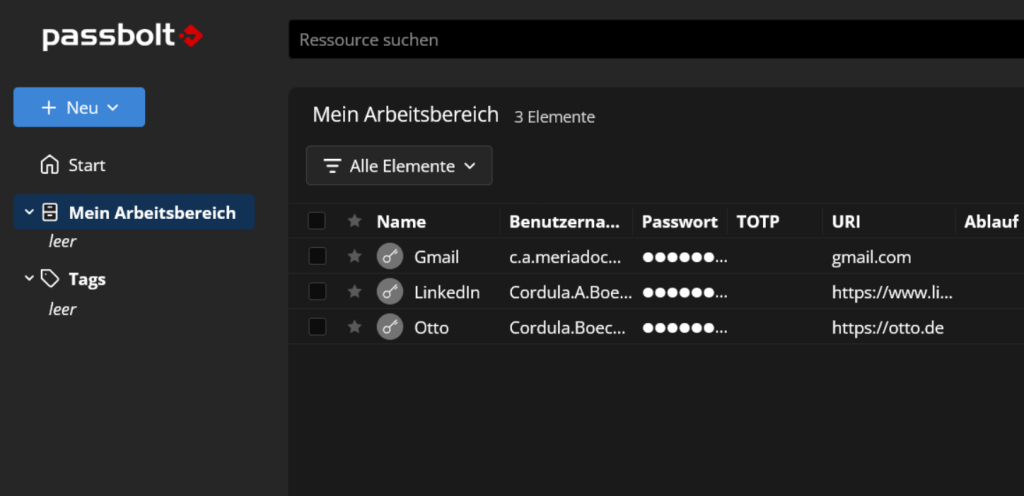
Passbolt – Control and self-hosting for advanced needs
Passbolt follows a very different approach compared to most password managers:
More control, less simplicity
It is designed mainly for teams that want full control over their data and are willing to handle a more technical setup. Passbolt is open source, which means the code is transparent and can be reviewed. It also allows self-hosting, so companies can run it on their own servers instead of relying on a third-party cloud.
Strengths:
- open source and fully transparent
- self-hosting possible (full data control)
- strong team collaboration and access management
- end-to-end encryption based on GPG
Passbolt is built with security and control in mind. It allows companies to manage access rights in detail and share credentials securely within teams. This is especially useful in environments where multiple people need access to the same systems.
Challenges:
- more technical setup, especially with self-hosting
- requires basic IT knowledge
- less polished and less user-friendly than typical cloud tools
Because of this, Passbolt is not ideal for every company. It requires more time and understanding to set up and maintain.
Typical use cases:
- IT-focused companies and teams
- agencies and developer environments
- organizations with their own infrastructure
Positioning:
Passbolt is not a plug-and-play solution. It is a tool for companies that want to take full responsibility for their data and systems. If your organization values maximum control and has the technical capacity to manage it, Passbolt can be a powerful solution.
The key difference: convenience vs. control
At first glance, many password managers appear quite similar. They all promise secure storage, password generation, and better access management. However, the real difference is not found in the features themselves, but in the underlying strategy of each solution. Every tool follows a different philosophy, and this directly influences how it fits into a company’s daily operations.
Keeper Security is built around convenience and fast implementation. It is designed to work immediately, with minimal setup and a strong focus on usability. Companies can introduce it quickly, and employees can start using it without technical barriers. This makes it especially suitable for businesses that need a reliable solution without additional complexity.
Proton Pass, on the other hand, places its main focus on privacy and encryption. The goal is not only to manage passwords securely, but also to ensure that data remains protected and inaccessible to third parties. This approach appeals to organizations that see data protection as an essential part of their responsibility and want to rely on transparent, privacy-focused solutions.
Passbolt follows a different path. It is centered on control and infrastructure. Instead of relying fully on external services, companies have the option to manage their own environment and take full ownership of their data. This creates a higher level of control, but also requires more technical understanding and effort.
These differences are not just technical details. They reflect different priorities and different ways of thinking about security. This is why the common question, “Which tool is the best?”, often leads to the wrong conclusion. A solution that works perfectly for one company may not work at all for another.
A highly secure but complex system will not improve security if it is not used correctly by the team. At the same time, a simple and convenient tool may not be sufficient for organizations with higher security requirements or compliance needs.
The real question is therefore not about finding the best tool, but about understanding what level of control, complexity, and responsibility fits your company. Security is not defined by features alone, but by how well a solution integrates into everyday processes and how consistently it is used.
In the end, choosing a password manager is not just a technical decision. It is a strategic decision about how your organization wants to handle security.
Who is each solution suitable for?
Choosing the right password manager depends less on features and more on the type of organization you are running. Different companies have different needs, resources, and priorities. The following overview helps you understand which solution fits best in practice.
✔️ Keeper Security
Keeper is the best choice for small and medium-sized businesses that want a reliable and easy-to-use solution.
It works especially well for teams without an internal IT department, where simplicity and speed are important. Companies can implement Keeper quickly and start improving their security without dealing with technical setup or infrastructure.
This makes it ideal for organizations that prefer a pragmatic approach: clear processes, minimal complexity, and a solution that employees actually use in their daily work.
In most cases, Keeper is the right starting point for businesses that want to improve security without slowing down operations.
✔️ Proton Pass
Proton Pass is well suited for companies that place a strong focus on data protection and privacy.
It is a good option for organizations that want to align with European standards and care about where their data is stored and how it is protected. This can be especially important in industries where trust and transparency play a key role.
As a modern cloud solution, Proton Pass combines strong encryption with a clean and user-friendly interface. It offers a balance between usability and privacy, without requiring technical setup.
It is a strong choice for companies that want a secure and privacy-focused solution, but still value ease of use.
✔️ Passbolt
Passbolt is designed for IT-oriented organizations that have the technical capacity to manage their own systems.
It is most suitable for companies with their own infrastructure or technical teams who are comfortable working with more advanced setups. These organizations often have a higher requirement for control and want to manage their data independently.
Passbolt offers a high level of flexibility and control, especially through its open-source approach and self-hosting options. However, this also means that it requires more effort and responsibility.
It is the right choice for companies that are willing to invest time and resources in exchange for maximum control over their data and access management.
The 3 Best Password Managers for Businesses in 2026
Choosing a password manager is not about finding the most popular or feature-rich tool. It is about making a decision that fits your business, your processes, and your level of responsibility. As shown in this article, Keeper Security, Proton Pass, and Passbolt each represent a different approach to security. One focuses on simplicity and fast implementation, another on privacy and data protection, and the third on control and infrastructure. There is no universal “best” solution. A tool that works perfectly for one company may not be suitable for another. The real value comes from choosing a solution that your team understands, accepts, and uses consistently.
For most small and medium-sized businesses, a simple and reliable solution is often the best starting point. At the same time, companies with higher privacy or control requirements may benefit from more specialized tools. In the end, a password manager is not just a technical tool. It is a core part of your company’s security strategy. Making the right choice means reducing risk, improving processes, and building a more secure foundation for your daily operations.
If you want to go beyond theory and understand how secure your current setup really is, my Browser & Password Security Report gives you a clear and practical overview. You will learn where your biggest risks are, how your current passwords and access points are structured, and what you can improve immediately—without unnecessary complexity.
I also recommend to read the follows articels:
The Truth About Password Managers: Security Requires More Than a Tool
Top 6 Password Managers Compared: Which One Keeps You Safest in 2026?
Follow my YouTube channel for more insights on cybersecurity and online security.
I share practical strategies, real-world risks, and simple ways to protect your business in today’s digital environment.