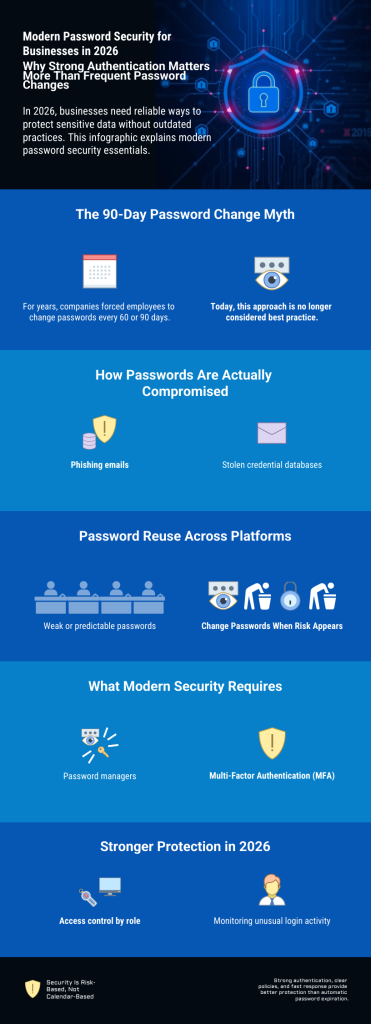

Passwords remain one of the most important security layers in any company. Employees use them daily to access email, cloud storage, internal systems, and customer data — making password security a core part of business operations. For years, the standard rule was simple: change every password every 60 or 90 days. This policy was written into IT guidelines and security handbooks, based on the belief that regular changes automatically meant better protection. But the threat landscape has changed. Cybercriminals today rely less on guessing passwords and more on phishing, stolen databases, and automated attacks. Time-based rules alone no longer reflect how modern risks actually work.
This raises a key question: does forcing employees to change passwords every few months really improve security — or does it create frustration, weak habits, and new vulnerabilities? In this article, you will learn what current security recommendations suggest in 2026, when password changes are truly necessary, and how companies can build a practical strategy that protects systems without slowing down daily work.
1. The old 90-day rule – does it still make sense?
For many years, the 60- or 90-day password change rule was considered a standard security measure across industries. Auditors expected it, IT departments enforced it, and employees accepted it as a normal part of working life. The reasoning behind the rule was straightforward: if an attacker secretly gained access to a password, the potential damage would be limited because the password would expire within a predictable timeframe. Regular rotation, so the thinking went, acted as a built-in safety net.
At first glance, this logic seems sound. But real-world experience has revealed a fundamental problem — the rule assumes that employees will respond to frequent change requirements by creating strong, entirely new passwords each time. In practice, that rarely happens.
When people are forced to change their passwords every few months, they naturally look for the path of least resistance. Rather than generating a completely new and complex password, most employees make small, predictable modifications to their existing one. A password like Winter2025 becomes Spring2026. CompanyName1 turns into CompanyName2. An exclamation mark gets added at the end, or a number gets incremented by one. These patterns feel like changes, but they follow a logic that is well known to attackers. Automated tools are specifically designed to test common variations, and experienced cybercriminals are very familiar with how people adapt passwords under pressure.
Beyond weak password patterns, frequent forced changes also tend to drive poor security behavior more broadly. When employees feel overwhelmed by constantly updating credentials across multiple systems, they often develop informal workarounds. Passwords get written on sticky notes next to monitors, stored in unprotected text files, or shared with colleagues to avoid the hassle of repeated resets. Some employees simply reuse the same password across different platforms, which means a single breach can quickly compromise multiple accounts. In these cases, a policy that looks strong on paper is actively making the organization less secure in practice.
There is also a deeper technical argument against the 90-day rule. Modern cyberattacks are rarely slow or patient. Phishing campaigns can capture login credentials within minutes of a user clicking a malicious link. Stolen credentials from data breaches are bought and sold on criminal platforms within hours. Automated login attempts can compromise an account long before any scheduled password expiration takes effect. The old assumption — that an attacker with a stolen password would sit quietly and wait — simply does not reflect how attacks work today.
Given all of this, it is not surprising that many leading security frameworks and expert organizations have moved away from recommending automatic password expiration as a default policy. The focus has shifted instead toward stronger initial password creation, the use of Multi-Factor Authentication, and continuous monitoring for suspicious activity. These measures address the actual attack vectors in use today, rather than defending against a slower, simpler threat model from the past.
The core insight is this: a weak password that gets changed every 90 days is still a weak password. A strong, unique password backed by Multi-Factor Authentication offers significantly better protection — even if it never changes automatically. Security comes from strength and layered defenses, not from a calendar.
2. What do current security recommendations say in 2026?
In 2026, most modern security recommendations no longer support automatic password changes without a specific reason. The focus has clearly shifted from time-based rules to risk-based protection. Instead of asking, “Has it been 90 days already?”, companies are encouraged to ask, “Is there any sign that this account may be compromised?”
This change reflects how cyber attacks actually happen today. Many security incidents are not the result of long-term hidden access. They are fast, targeted, and often linked to phishing emails or stolen login data from other platforms. Because of this, changing passwords on a fixed schedule does not automatically reduce risk. If a password is stolen today, waiting for the next planned expiration date does not protect the company.
Current security strategies emphasize strong passwords from the beginning. A long and unique passphrase is much more effective than a short password that changes frequently. When employees use strong credentials that are different for every system, the overall attack surface becomes smaller. If one account is exposed, others remain protected.
Another key element in 2026 is Multi-Factor Authentication. A password alone is no longer seen as sufficient protection. When a second factor is required, such as a mobile confirmation code or hardware token, the security level increases significantly. Even if an attacker manages to steal a password, access is still blocked without the additional authentication step. This makes forced password rotation less important in many environments.
Monitoring has also become a central part of modern security recommendations. Instead of relying on scheduled password resets, companies are encouraged to monitor login behavior and system activity. Many platforms can detect unusual patterns, such as login attempts from unexpected countries, repeated failed login attempts, or access at unusual times. When such behavior is identified, companies can immediately reset the password and investigate the situation. This targeted response is more effective than changing all passwords regularly without evidence of a threat.
However, this does not mean that passwords should never be changed. A password should be updated immediately if there is any sign of compromise. For example, if an employee falls for a phishing email, if login data appears in a public breach, or if suspicious activity is detected in system logs, action must be taken without delay. The same applies when employees leave the company or when shared accounts are involved. In these cases, immediate password changes are a necessary protective measure.
The overall principle in 2026 is clear. Password management should be practical, realistic, and aligned with actual risk. Security should strengthen the company’s defense without creating unnecessary complexity for employees. A well-designed password strategy focuses on strong initial protection, additional authentication layers, and fast reaction to real incidents. This approach reflects a more mature understanding of cybersecurity. It recognizes that effective protection is not created by routine repetition, but by intelligent control and active awareness of real threats.
If you want practical guidance on building truly secure credentials, read our guide on how to create secure passwords that are extremely difficult to crack.: How to create secure passwords that are extremely difficult to crack
3. Why strong authentication is more important than frequent changes
In today’s threat landscape, the biggest risk is not that someone slowly guesses a password over several months. Most modern attacks are fast and automated. Cybercriminals use large databases of stolen login data, automated login tools, and phishing campaigns that can capture credentials within minutes. Because of this, simply changing passwords every few months does not address the real problem.
The real question is not how often a password changes. The real question is how well an account is protected if a password is exposed.
This is where strong authentication becomes critical. A long and unique password is the foundation, but it should not be the only layer of protection. When companies rely on passwords alone, a single mistake — such as clicking on a phishing link — can give attackers full access. However, when Multi-Factor Authentication is enabled, the situation changes completely. With Multi-Factor Authentication, access requires something more than just a password. It may require a code sent to a mobile device, confirmation through an authentication app, or a physical security key. Even if an attacker obtains the password, they cannot log in without this second factor. This dramatically reduces the success rate of common attacks.
Strong authentication also improves protection against password reuse. Many people tend to reuse passwords across different services. If one external platform suffers a breach and login data is leaked, attackers often test those credentials on business systems. When every system uses a unique password and Multi-Factor Authentication, this risk is significantly reduced. Another important factor is the use of password managers. In modern companies, employees often handle dozens of accounts. Expecting them to remember complex and unique passwords without support is unrealistic. A secure password manager allows the creation of long, random passwords without increasing mental workload. This improves security and usability at the same time.
However, companies should understand that security requires more than just installing a tool. We explain this in detail in our article The Truth About Password Managers: Security Requires More Than a Tool.
Access control also plays a major role. Not every employee needs access to every system. By limiting permissions based on job roles, companies reduce the potential impact of a compromised account. If one account is affected, the damage remains limited. When these measures are in place — strong unique passwords, Multi-Factor Authentication, password managers, and controlled access rights — the importance of frequent password changes decreases. The system is already protected by multiple layers. Security no longer depends on one single secret that must be replaced every few months.
In modern cybersecurity, layered protection is more effective than routine password rotation. Strong authentication creates a barrier that is much harder to bypass. It protects against real-world attack methods, not theoretical risks. The goal is not to force constant password updates. The goal is to make unauthorized access extremely difficult from the beginning.
A secure password manager helps generate and store strong credentials safely. If you are comparing tools, read our detailed analysis: Top 6 Password Managers Compared: Which One Keeps You Safest in 2026?
4. Special cases where regular changes can still be useful
5. A practical recommendation for small and mid-sized businesses
For most small and mid-sized businesses in 2026, the goal should be practical security that reduces real risk without creating unnecessary complexity. Many smaller companies do not have large IT departments. Security policies must therefore be clear, realistic, and easy to manage. Instead of forcing all employees to change their passwords every few months, companies should first ensure that strong password rules are in place from the beginning. Passwords should be long, unique, and difficult to guess. A passphrase with several random words is often more secure and easier to remember than a short and complex password with many symbols.
Multi-Factor Authentication should be activated wherever possible, especially for email accounts, cloud services, remote access systems, and administrative accounts. In many attacks, email accounts are the primary target. Protecting them with an additional authentication layer significantly reduces the overall risk. It is also highly recommended to use a secure password manager across the company. This allows employees to generate and store strong passwords without writing them down or reusing them. A password manager improves both security and efficiency, which is especially important in growing businesses.
Another key measure is regular access review. Companies should periodically check who has access to which systems. When employees change roles or leave the company, access rights must be adjusted immediately. This step is often more important than routine password changes. Monitoring login activity is equally important. Many modern platforms provide alerts for unusual login attempts or suspicious behavior. Companies should enable these notifications and respond quickly when something looks unusual. Immediate action after a security concern is far more effective than automatic password expiration.
In practical terms, a modern password strategy for small and mid-sized businesses should focus on strong initial protection, additional authentication layers, and fast response to incidents. Routine password changes without a reason should no longer be the central security measure. Cybersecurity should support business operations, not interrupt them. A well-balanced password policy strengthens protection while keeping daily work smooth and productive.
Conclusion: How often should companies change passwords in 2026?
In 2026, the answer is clear: companies should not change passwords based on fixed time intervals alone. The old 60- or 90-day rule is no longer considered best practice in most modern environments. Scheduled password changes without evidence of risk often create frustration, weak password patterns, and unnecessary workload.
They may look secure on paper, but they do not automatically reduce real-world threats. Instead, companies should focus on stronger foundations. Long and unique passwords, Multi-Factor Authentication, controlled access rights, and active monitoring provide far better protection than routine expiration policies. When these measures are in place, the need for regular password rotation becomes much less important.
Passwords should be changed immediately when there is a clear reason — for example after a phishing incident, a data breach, suspicious login activity, or employee offboarding. In these cases, fast reaction is critical.
So how often should companies change passwords in 2026?
Only when risk requires it — not when the calendar demands it. Modern cybersecurity is not about following outdated habits. It is about understanding real threats and responding with practical, risk-based measures that protect systems without slowing down business operations. Strong authentication. Clear policies. Intelligent response. That is what effective password security looks like in 2026.