


What Is a Firewall — and What It Cannot Do Alone
A firewall is a security system that monitors and controls the traffic flowing in and out of your network based on a defined set of rules. Every data packet that enters or leaves your systems passes through the firewall, which then decides whether to allow or block it. In theory, this creates a strong barrier between your internal infrastructure and the outside world.
A helpful way to think about it is this: imagine a security guard standing at the entrance of your office building. His job is to check who comes in, who goes out, and whether they are supposed to be there. Now imagine that this security guard was hired years ago, has never received any additional training, is working from an outdated visitor list, and waves through anyone who looks vaguely familiar. That is exactly what a misconfigured or neglected firewall does — it creates the appearance of security without actually providing it.
There are different types of firewalls, and understanding the differences matters. A basic packet filter firewall checks only the source and destination of network traffic — it does not look at the content of the data itself. A stateful firewall goes one step further by tracking the state of active connections. A next-generation firewall, or NGFW, adds capabilities such as deep packet inspection, application awareness, and integration with threat intelligence. Each level offers more protection, but only if it is correctly implemented and actively managed.
This is where many organizations fall short. A firewall is a tool, not a solution in itself. It requires an initial configuration that reflects your specific network environment, regular updates as that environment changes, and ongoing monitoring to detect unusual activity. Without these three elements, even the most advanced firewall will have blind spots that a determined attacker can find and exploit.
A firewall does not protect you by simply existing. It protects you only when it is correctly set up, consistently maintained, and actively monitored. Treating it as a one-time installation rather than an ongoing responsibility is one of the most common — and most costly — mistakes a business can make.
In the end, a firewall is only one layer of your overall security strategy. It cannot stop every threat on its own, especially once ransomware reaches an endpoint. This is where endpoint protection becomes critical. If you are currently relying on built-in solutions, you should also read our analysis on Will Windows Defender still be secure enough in 2026? What businesses should know before relying on it, to better understand its strengths and limitations.
Common Firewall Misconfigurations That Ransomware Exploits
1. Overly Permissive Outbound Rules
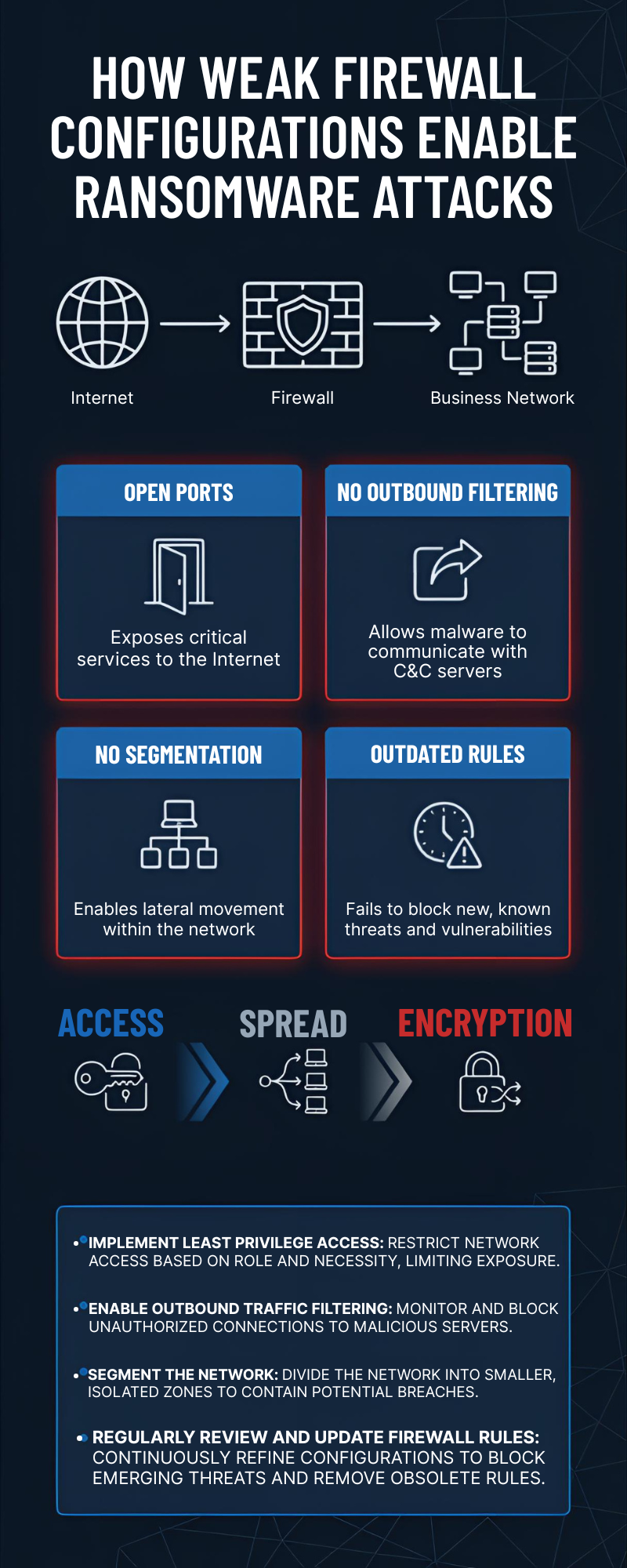
When IT teams configure a firewall, the focus is usually on blocking threats from the outside. Inbound traffic gets carefully filtered, and rules are put in place to prevent unauthorized access from the internet. Outbound traffic — data leaving the network — is often treated as inherently safe and left largely unrestricted.
Ransomware operators know this, and they use it to their advantage. Once malware has found its way onto a system inside your network, it typically needs to establish a connection to an external command-and-control server. Through this connection, attackers can send instructions to the malware, receive stolen data, or deliver the encryption keys used in a ransomware attack. If your firewall places no restrictions on outbound traffic, this communication happens freely and silently, without triggering any alert.
A well-configured firewall should apply a default-deny policy to outbound connections just as it does to inbound ones. Only traffic to known, approved destinations should be permitted. Everything else should be blocked and logged for review.
2. Open or Unused Ports
Every open port on your network is a door. Some doors need to be open for your business to function — but every unnecessary open door is a risk. Attackers run automated scans across large ranges of IP addresses to find systems with exposed ports, and they do this continuously, around the clock.
One of the most frequently exploited examples is RDP, or Remote Desktop Protocol, which operates on port 3389. RDP allows users to connect to a computer remotely, which makes it genuinely useful for IT teams and remote workers. However, when RDP is left exposed to the internet without additional protection such as a VPN or multi-factor authentication, it becomes one of the most common entry points for ransomware attacks. Attackers either brute-force weak credentials or exploit known vulnerabilities in the RDP service itself.
The same applies to other services that are often left open out of habit or convenience — FTP, Telnet, outdated management interfaces, and legacy protocols that are no longer needed. A regular port audit should be part of every organization’s security routine. If a port does not serve a current, documented business purpose, it should be closed.
3. Flat Network Architecture with No Segmentation
In a flat network, every device can communicate with every other device. There are no internal boundaries, no separate zones, and no restrictions on how traffic moves between systems. This kind of architecture is simple to set up and easy to manage — but it is extremely dangerous from a security perspective.
When ransomware enters a flat network, it can move laterally without meeting any resistance. A single compromised laptop can reach the file server, the backup system, the finance department’s workstations, and the production environment — all within minutes. There is nothing in place to slow it down or contain it.
Network segmentation solves this problem by dividing the network into separate zones, each with its own access rules. For example, the accounting department should not have direct access to the operational technology environment, and a guest Wi-Fi network should never be able to reach internal servers. By implementing these internal boundaries — enforced by firewall rules — you dramatically reduce the potential blast radius of any successful attack. Even if one segment is compromised, the rest of the network remains protected.
4. Outdated Firewall Rules
A firewall rule that made sense two years ago may represent a serious security gap today. Networks are not static — they evolve constantly. New software gets installed, third-party vendors are granted temporary access, employees leave the company, and old systems are replaced. But the firewall rules created to support these changes are rarely cleaned up with the same diligence.
Over time, this creates what security professionals call “rule bloat” — a long list of accumulated permissions, many of which no longer have a valid business justification. Each of these outdated rules is a potential pathway for an attacker. A rule that was originally created to allow a former vendor to access a specific system, for example, may still be active long after that vendor relationship ended.
Keeping firewall rules current requires a structured review process. Every rule should have a documented owner, a clear purpose, and an expiry date or review cycle. Rules that can no longer be justified should be removed promptly. This is not a glamorous task, but it is one of the most effective ways to reduce your attack surface.
5. No Deep Packet Inspection (DPI)
Traditional firewalls make their decisions based on relatively simple criteria: where is this traffic coming from, where is it going, and which port is it using? This approach works well against straightforward threats, but it has a significant blind spot — it tells you nothing about what is actually inside the data being transmitted.
Modern ransomware takes advantage of this limitation. Malicious traffic is increasingly hidden inside legitimate-looking protocols, particularly HTTPS. Because HTTPS traffic is encrypted, a standard firewall cannot read its contents — it sees only that an encrypted connection is being made to a destination on the internet, which looks completely normal. Inside that connection, however, ransomware may be receiving commands, exfiltrating data, or downloading additional malicious components.
Deep packet inspection addresses this by analyzing the actual content of network traffic, even encrypted traffic when combined with SSL/TLS inspection capabilities. Next-generation firewalls with DPI enabled can identify suspicious patterns, block known malicious domains, and detect anomalies that would be invisible to a basic firewall. For any organization handling sensitive data or operating in a regulated industry, this level of visibility is no longer optional — it is a fundamental requirement.
A Real-World Example
To understand how these misconfigurations play out in practice, it helps to walk through a realistic scenario — one that closely mirrors incidents that security teams investigate on a regular basis.
Consider a medium-sized logistics company with around 80 employees. The business runs smoothly: orders are processed, deliveries are tracked, and the IT infrastructure supports day-to-day operations without major issues. A firewall is in place, and the IT manager considers the network reasonably well protected. There has not been a serious incident in years, and a full security review has not felt urgent enough to prioritize.
What the IT manager does not know is that port 3389 — used for Remote Desktop Protocol — is still open on one of the internal servers. It was enabled two years ago to give a logistics software vendor temporary remote access during an integration project. The project ended, the vendor moved on, but nobody ever closed the port or removed the associated firewall rule. It has been sitting there ever since, exposed to the internet, quietly waiting.
An attacker running an automated scan across a range of IP addresses finds the open port within minutes. This kind of scanning is not sophisticated — tools that do this are freely available, and threat actors run them continuously as part of their standard workflow. The attacker identifies the server, notes the open RDP port, and begins a brute-force attack against the login credentials. The server is using a service account with a weak password that was set up during the original vendor project and never changed. After a relatively short time, access is granted.
The attacker is now inside the network. Rather than acting immediately, they spend time moving quietly through the environment — a phase known as lateral movement. Because the network has no segmentation, there are no internal boundaries to slow them down. They map out the infrastructure, identify the file servers, locate the backup systems, and assess how much of the environment they can reach. The answer is: almost all of it.
When the ransomware is finally deployed, it spreads rapidly. File servers are encrypted within the first hour. Backup systems — which were connected to the same network segment — are reached and encrypted shortly after, eliminating the most obvious recovery option. Workstations across multiple departments lock up one by one. By the time the IT manager receives the first alert, the damage is already severe.
The business comes to a complete standstill. Orders cannot be processed, delivery tracking goes offline, and customer communication breaks down. The recovery process takes four days of intensive work, significant external support costs, and a difficult conversation with customers about why their shipments were delayed. The financial damage runs into the tens of thousands of euros — and that figure does not include the reputational impact or the time lost by every employee who could not do their job.
The root cause was not a sophisticated zero-day attack. It was an open port, a weak password, and a firewall rule that had never been cleaned up. Three small oversights, each entirely preventable, combined to cause a serious business disruption.
This is not a rare scenario. It does not happen only to large enterprises with complex infrastructure or to companies in high-profile industries. It happens to businesses of all sizes, across all sectors, every single week. The attackers are not always highly skilled — they are often opportunistic, using automated tools to find easy targets. A poorly maintained firewall is exactly the kind of easy target they are looking for.
What You Should Do Now
Protecting your business does not require an unlimited IT budget. It requires clear priorities, structured thinking, and consistent action over time. Most ransomware incidents are not caused by highly advanced attacks, but by small, preventable weaknesses that were never addressed.
Start with a focused firewall audit. Take a close look at all open ports, active services, and existing rules. Do not assume that older configurations are still valid. Many rules were created for temporary access, testing, or past projects and were never removed. Ask a simple but powerful question for each rule: Is this still required for business operations today? If the answer is unclear or “probably,” it should not remain open. Reducing unnecessary exposure is one of the fastest ways to improve your security posture.
Next, move toward a default-deny approach for both inbound and outbound traffic. This means that all connections are blocked unless there is a clearly defined rule that allows them. While this may sound restrictive at first, it creates a much stronger security baseline. Instead of trusting traffic by default, your team actively decides what is allowed. This significantly reduces the risk of unnoticed access paths and makes your firewall rules more transparent and easier to manage.
It is also important to control outbound traffic, not just incoming connections. Many businesses overlook this step. However, ransomware often depends on external communication to function properly. By limiting outbound connections to trusted destinations only, you can disrupt these communication channels and reduce the impact of an attack, even if a system is already compromised.
If your current setup relies on a basic packet-filter firewall, consider upgrading to a next-generation firewall (NGFW). Modern threats operate at a much deeper level than simple IP and port filtering. NGFWs provide advanced capabilities such as application awareness, encrypted traffic inspection, and integration with real-time threat intelligence. This allows you to detect suspicious behavior that traditional firewalls would completely miss. For many businesses, this is a practical upgrade that delivers a strong increase in security without excessive cost.
Another key step is network segmentation. Do not rely on a single firewall at the perimeter. Separate critical systems, sensitive data, and user environments into different segments. This ensures that even if ransomware enters one part of the network, it cannot spread freely across the entire infrastructure. Segmentation adds an internal layer of defense that many attackers are not prepared for.
Monitoring and visibility should also be part of your strategy. Enable logging and review it regularly. Look for unusual patterns such as repeated login attempts, unexpected traffic spikes, or connections to unknown external servers. These signals often appear before a full attack happens. Early detection can make the difference between a small incident and a major disruption.
Finally, do not treat firewall configuration as a one-time task. Your network is constantly evolving—new tools are added, employees work remotely, and business processes change. Your security controls must evolve as well. Schedule regular reviews, at least every quarter, and update your configurations based on current needs. A firewall is not “set and forget.” It is a system that requires ongoing attention to remain effective.
If you are unsure whether your current configuration is secure, reviewing the most important firewall settings is a strong first step. Our article Windows Firewall Rules: The 5 Settings Every Business Should Check can help you identify common weaknesses before they become real security incidents.
Conclusion: How ransomware bypasses firewall configurations and how to prevent it
Ransomware attacks are not successful because firewalls do not exist—they succeed because firewalls are often misconfigured, outdated, or not actively managed. A firewall alone does not guarantee security. It must be part of a broader, well-maintained defense strategy.
To truly secure your firewall against ransomware attacks, businesses need to focus on continuous improvement. This means regularly reviewing firewall rules, limiting access to only what is necessary, and monitoring both inbound and outbound traffic. Network segmentation, timely updates, and clear visibility into network activity are no longer optional—they are essential.
Cybercriminals are constantly looking for easy entry points. Weak configurations give them exactly what they need. But the advantage is on your side: most of these risks can be reduced with structured, consistent action.
In the end, effective cybersecurity is not about having more tools. It is about using the tools you already have in the right way. A well-configured firewall, combined with proactive security practices, can significantly reduce your exposure to ransomware and protect your business from costly disruptions.
If you want to stay informed about the latest ransomware threats, firewall best practices, and real-world cybersecurity insights, follow my updates on Facebook. We regularly share practical tips, security checklists, and new articles to help you protect your business more effectively.
👉 Follow my Facebookpage to stay one step ahead of modern cyber threats.